A starting direction, then a real build
Pick the design you like, then get a site built around your offices and providers rather than around the layout.
Service file
A template gets a single practice online quickly and cheaply, and for a one-office practice with simple needs that can be enough. It stops working at the point your practice has more than one address, more than a handful of providers, or a service offered at some locations and not others. We use starting designs rather than templates: you pick a direction, and the site is then built around your offices and providers rather than around the layout. This page explains the difference honestly, including when a template is genuinely the right call.
What it costs
Templates solve the blank page. They give you a layout that has been tested on real screens, a sensible page order and a starting point for photography and type, which removes weeks of deciding. If you run one office, offer a normal range of general dentistry, and mostly need patients to find your address, your hours and a phone number, a template plus good photography will do the job. We would rather say that plainly than sell a group build to a practice that does not need one yet.
The trouble starts at the second address. Most dental templates assume one location, so a group ends up with a locations page listing addresses instead of a page per office, which means only one office is really in search results. Providers get a shared team grid rather than pages of their own. Services cannot be scoped to the offices that offer them. Then there is maintenance: a template sits on a theme and a plugin stack, and both need updating forever. The saving at purchase turns into a monthly obligation that nobody in the group actually owns.
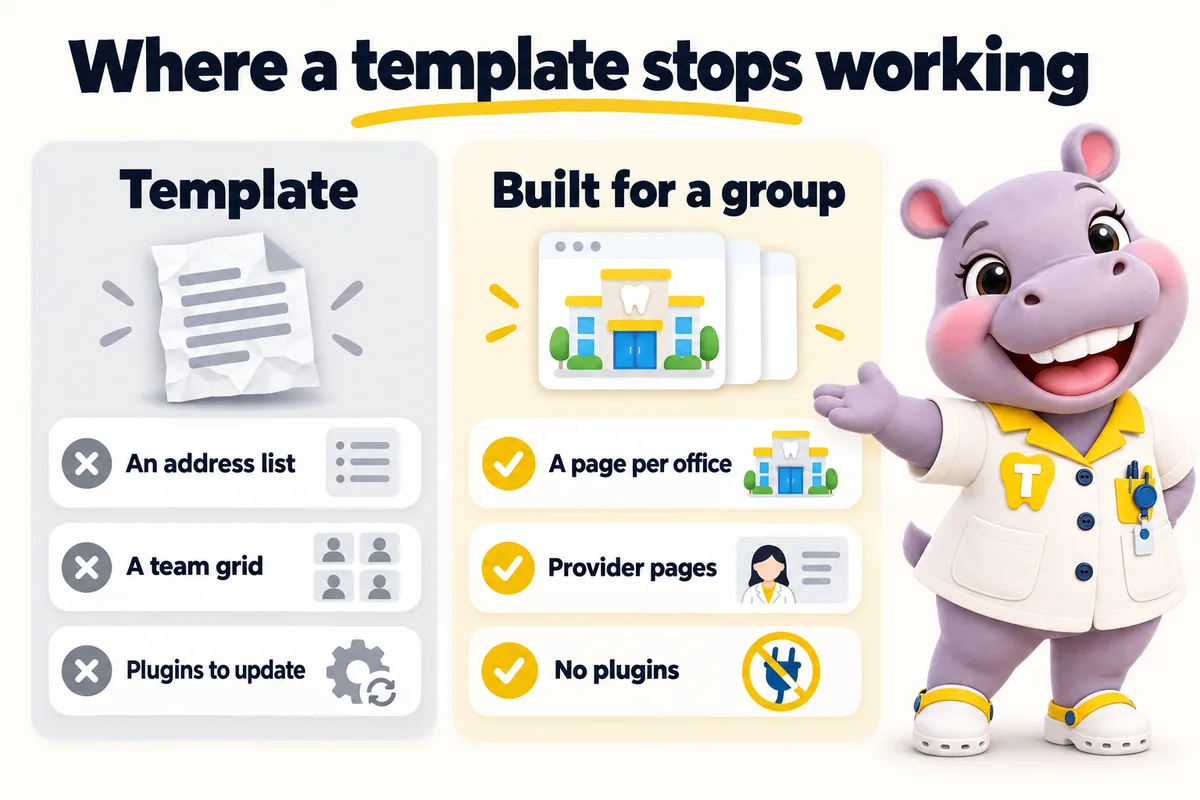
Our starting designs work the other way round. You pick the direction you like, we build your site to it, and then the design is yours to change through revisions rather than something you have to work around. Because the pages are generated from your offices, providers and services, choosing a starting design does not lock the structure: the same content can be redressed later without rebuilding the site. You never maintain the design yourself, and there is no theme to update, which is the part of template ownership that costs the most over time.
Most groups come to us from a template, and the migration is a known piece of work. We map every existing page to its new address, keep every page that ranks, redirect the rest, and carry across reviews, provider biographies and photography. Content that only existed inside a page builder is extracted rather than retyped. Old office domains keep working as redirects for as long as you keep them registered. You approve the map before launch, so nothing that earns you patients today quietly disappears on launch day.
Who it is for
Practices weighing a template against a built site, and practices already on a template that has started to pinch.
Symptoms
Cost
Starting designs are included. Your site is rebuilt around your brand and offices on any plan, with the $797 build fee invoiced only after launch.
Timeline
Counted from the onboarding call, not from purchase. Revisions after launch are completed within 2 to 5 working days.
How the work is done
The same four steps for every service. The only thing paid before launch is the first month.
Pick a plan and pay the first month. That is the whole commitment; the $797 build fee waits until your site is live.
Thirty minutes with your operations lead: offices, providers, services, brand, where each office's requests should go, and hub or one site per location.
We design the site, write the pages, configure the finder for each office and connect each front desk. You review, we revise.
Your site goes live in 7, 10 or 15 days depending on the plan. Only then is the $797 build fee invoiced. Weekly updates start the same week.
Thirty minutes
We open a site built for a group like yours, walk the pages a patient would, and tell you which plan fits. Plans from $137 a month; the $797 build fee is invoiced after launch.
Deliverables
Pick the design you like, then get a site built around your offices and providers rather than around the layout.
Redress the site through revisions without rebuilding it, because the pages are generated from your records.
Nothing on the site needs a monthly update to stay safe, and nothing breaks because a plugin author moved on.
Page map, 301 redirects, and reviews, biographies and photography carried across before launch.
Copy trapped in a page builder is pulled out and rebuilt as real pages you can keep.
If a single-office practice would be well served by a template, we will say so rather than sell you a group build.
Risk reversal
Each promise is written with its condition in plain sight, so nothing is discovered after the invoice.
The $797 one-time build fee is invoiced after launch, once you have seen the site live and are happy with it.
Condition The first monthly fee is paid up front to start the plan.
Every page we build scores at or above the target on mobile and desktop at launch.
Condition If a page drops below it because of our work, we fix it at no charge and it does not use a revision.
The site starts ranking for local searches in your area within the window.
Condition If it has not, we keep working on it at no charge. We never promise a specific position.
Built in, not bolted on
A dental website carries obligations a brochure site does not. These ship with every plan, written for your practice and reviewed by you before launch.
These pages and practices help you meet common US requirements for a dental practice website. They are not legal advice, and we recommend your own counsel reviews the policies before launch. We are not a dental practice, dental group, dentist or healthcare provider, and we are not a law firm.
A privacy policy and site terms written around what your site actually collects, drafted for your review and your counsel's sign-off. Built with state privacy laws such as the CCPA in California in mind.
Analytics and marketing tags load only after a visitor agrees, and the cookie policy lists what the consent banner controls.
Real contrast ratios, visible focus states, keyboard navigation and alt text, built with the Americans with Disabilities Act (ADA) and WCAG 2.2 AA in mind, plus a statement telling patients how to report a problem.
Request forms are designed not to collect health information. That keeps the website out of your HIPAA scope as far as a website can be, while your intake system handles records.
Where a form or the AI Engine sends texts, consent wording sits next to the phone field, and we file the A2P 10DLC carrier registration for you on plans with the AI Engine.
Service pages and articles say they are general information, not a diagnosis or treatment plan, and send patients to your providers for anything about their own care.
Reviews
Most of our visitors are on phones, so that is where I reviewed the new dental office selection pages. The essentials are within the first screen, with an obvious way to inquire. It is far more practical than the old page when we share it with a caller.
Got Mobile navigation and page layout for dental office selection
Updating dental office selection content used to mean describing a change by phone and hoping. Now I send the current wording and its replacement, review the preview, and confirm. Far easier than narrating edits and hoping they survived the telling.
Got Content approvals and change requests for dental office selection
Out of scope
So nobody is surprised after ordering. Each of these is a deliberate line, not an upsell waiting to happen.
We do not write treatment recommendations, success rates, outcome claims or before-and-after captions. Your clinicians own every statement about care.
Request forms ask for a name, contact details, the office, the service and a preferred time. Medical history, insurance IDs and consent forms stay in your own intake system, never on the website.
We build pages that are fast and relevant enough to be good landing pages for your ads. Running and bidding on the campaigns themselves stays with you or your ads partner.
We route requests into the system or CRM each office already uses, by API, Zapier or Make. We do not sell, host or administer the practice software itself.
We use the office and team photos you own and have consent to publish, sized for their slots. Where you have none yet we use neutral, non-clinical images until yours arrive.
There are none. One fee covers every office in the group; extra revisions beyond 5 a month are a flat $20 each.
What's in each plan
What each feature does, the everyday problem it removes, what you have to do (usually nothing), and which plan carries it.
Case studies
No. 02General dentistry
With dental office selection, people gave up partway through the menu or called simply to ask where things were. Even the team struggled to direct someone to the right page without a desktop in front of them.
15 working days
No. 07Orthodontics
Day to day with dental office selection, duplicated replies and orphaned messages happened in the same week. Stepping in for an absent colleague meant archaeology through long email chains.
20 working days
No. 08General dentistry
When it comes to dental office selection, there were no direct links to individual answers, just one long attachment. A thirty-second question required a three-megabyte reply.
25 working days
Starting designs are published on the templates page as they are released. Until a design you like is there, the fastest way to see what your site would look like is a demo, where we walk a build for a group like yours with your offices in the finder.
No. We sell one thing, which is a fully managed website: designed, built, hosted, updated weekly and revised monthly on one fee. Selling a file you then maintain would recreate the problem this page describes.
It depends on what your time is worth and who does the updating. The purchase is cheaper. The theme updates, plugin licenses, hosting, SSL, the developer you call when a form breaks, and the redesign when the theme is abandoned are not. We will not pretend to know your numbers, but those are the lines to compare.
That is what the page map and the 301 redirects are for. Every page that ranks keeps a destination, and offices that had no page of their own before usually gain one. We cannot promise a position, and we will not.
Yes, and usually you should. Real photographs of your actual offices and team outperform stock images, and we size and optimize whatever you send so it does not cost you page speed.
No. A starting design is a point of departure we rebuild around your brand, offices, providers and services before launch. You do not inherit its limits.
The new site is live in 7 days on Chairside, counted from the onboarding call, with old addresses redirected.
No. Weekly detail updates and revisions are applied by us, and nobody at the practice logs in to the website.
A live walk-through of the site you would get, in about 30 minutes. Plans from $137 a month, the $797 build fee invoiced only after launch, domain and hosting included.
Book a demoOr email and a person replies within one working day.
ChairsideWeb uses the cookies below. Necessary cookies keep the site working and cannot be turned off.
Saved on this device only. Press Esc to close.