A real page per provider
Credentials, role, languages, memberships and services, structured so a referred patient finds it on their name.
Service file
Patients search for clinicians by name more often than groups expect, especially after a referral or a recommendation. A provider page earns its place when it answers that search completely: who the clinician is, their credentials, the offices they work at and when, the services they offer, and a request button that reaches the front desk of the office the patient picked. Most group sites replace all of that with a headshot in a team grid, which answers nothing and ranks for nothing.
What it costs
Name, credentials and role first, because that is what a referred patient is checking. Then the offices they work at, with the days if their week is split, so the patient knows where to go. Then the services they offer, linked to the service pages. Then the biography, which is where most sites start and where patients rarely do. Then the request. Photography of the actual clinician, taken at the actual office, does more for trust than any paragraph, and it is the one asset we ask groups to invest in properly.
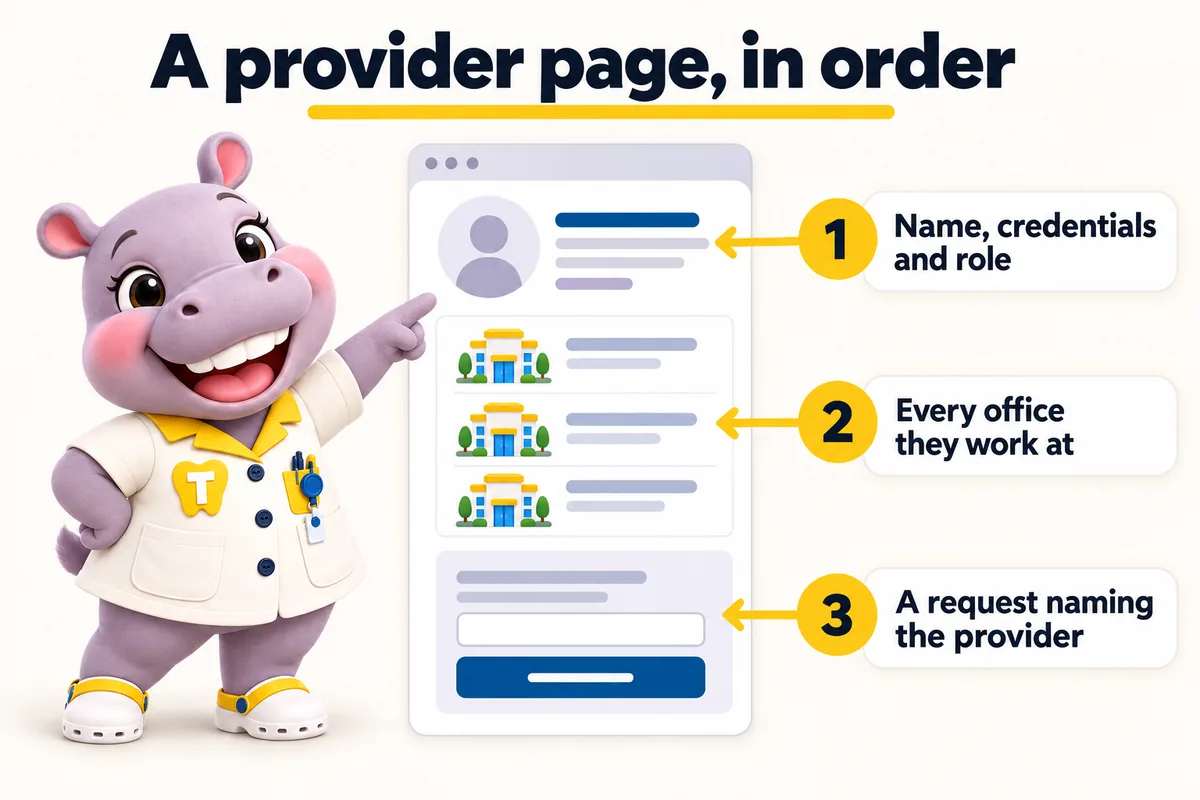
Each provider page carries Person schema with the credentials, the role and the offices the clinician works at, and each office page links back to the providers on site. That relationship is generated from your records rather than typed, which is why it stays true when someone moves. It also means a patient arriving from a search for a clinician name reaches a page that is unambiguous about where that clinician actually is, rather than a group page listing seven addresses and leaving them to guess.
A provider joining, leaving or changing which offices they cover is the most frequent change we apply for a group, and it is handled as a weekly detail update rather than a revision. Send it from any office and the provider page, the office pages that list them, the service pages, the finder and the schema all update together in the same week. Groups that maintain this by hand get the classic failure instead: a dentist who left eighteen months ago still smiling on the team page, which is the sort of detail patients notice and mention.
Provider pages describe credentials, training, languages spoken, professional memberships and the services a clinician offers. They do not carry success rates, case-count claims, before-and-after galleries presented as results, or comparisons with other clinicians. We are not a dental practice or a healthcare provider and we do not write clinical claims on your behalf. Anything of that kind has to come from your clinicians, with their own review and their own responsibility, and we will tell you where a line you send us crosses from description into a claim.
Who it is for
Groups where patients choose a clinician as much as an office: specialists, orthodontists, surgeons and busy general practices.
Symptoms
Cost
Provider pages are part of every plan. A new provider page is a revision; a provider moving offices is a weekly detail update and does not use one.
What's in each plan
What each feature does, the everyday problem it removes, what you have to do (usually nothing), and which plan carries it.
Out of scope
So nobody is surprised after ordering. Each of these is a deliberate line, not an upsell waiting to happen.
We do not write treatment recommendations, success rates, outcome claims or before-and-after captions. Your clinicians own every statement about care.
Request forms ask for a name, contact details, the office, the service and a preferred time. Medical history, insurance IDs and consent forms stay in your own intake system, never on the website.
We build pages that are fast and relevant enough to be good landing pages for your ads. Running and bidding on the campaigns themselves stays with you or your ads partner.
We route requests into the system or CRM each office already uses, by API, Zapier or Make. We do not sell, host or administer the practice software itself.
We use the office and team photos you own and have consent to publish, sized for their slots. Where you have none yet we use neutral, non-clinical images until yours arrive.
There are none. One fee covers every office in the group; extra revisions beyond 5 a month are a flat $20 each.
Reviews
The time we spent on the dental office selection wording was time well spent. It explains what an inquiry achieves and is honest about what still needs a proper discussion. Customers arrive with realistic expectations, which changes the whole tone of the first call.
Got Service scope and expectations for dental office selection
Our dental office selection information finally sits beside the contact details that belong with it. Each service description carries its own local contact, and the form inherits it. It removed an irritation on both sides of the phone line.
Got Location information and contact routing for dental office selection
The brief I gave them was simple: demonstrate, do not proclaim. The page now presents real material with captions that make sense of it. Visitors arrive having already seen how we operate, which shortens the first conversation.
Got Reference content and service presentation for dental office selection
Built in, not bolted on
A dental website carries obligations a brochure site does not. These ship with every plan, written for your practice and reviewed by you before launch.
These pages and practices help you meet common US requirements for a dental practice website. They are not legal advice, and we recommend your own counsel reviews the policies before launch. We are not a dental practice, dental group, dentist or healthcare provider, and we are not a law firm.
A privacy policy and site terms written around what your site actually collects, drafted for your review and your counsel's sign-off. Built with state privacy laws such as the CCPA in California in mind.
Analytics and marketing tags load only after a visitor agrees, and the cookie policy lists what the consent banner controls.
Real contrast ratios, visible focus states, keyboard navigation and alt text, built with the Americans with Disabilities Act (ADA) and WCAG 2.2 AA in mind, plus a statement telling patients how to report a problem.
Request forms are designed not to collect health information. That keeps the website out of your HIPAA scope as far as a website can be, while your intake system handles records.
Where a form or the AI Engine sends texts, consent wording sits next to the phone field, and we file the A2P 10DLC carrier registration for you on plans with the AI Engine.
Service pages and articles say they are general information, not a diagnosis or treatment plan, and send patients to your providers for anything about their own care.
Risk reversal
Each promise is written with its condition in plain sight, so nothing is discovered after the invoice.
The $797 one-time build fee is invoiced after launch, once you have seen the site live and are happy with it.
Condition The first monthly fee is paid up front to start the plan.
Every page we build scores at or above the target on mobile and desktop at launch.
Condition If a page drops below it because of our work, we fix it at no charge and it does not use a revision.
The site starts ranking for local searches in your area within the window.
Condition If it has not, we keep working on it at no charge. We never promise a specific position.
Deliverables
Credentials, role, languages, memberships and services, structured so a referred patient finds it on their name.
Including split weeks, generated from your records so it stays true when a clinician moves.
Credentials, role and office relationships emitted as structured data rather than typed into a template.
The booking request carries the provider, the office and the service to the front desk that will see the patient.
Joiners, leavers and office moves applied every week across pages, finder and schema without using a revision.
We size and place real photographs of your clinicians so they load fast and do not cost you the speed guarantee.
Thirty minutes
We open a site built for a group like yours, walk the pages a patient would, and tell you which plan fits. Plans from $137 a month; the $797 build fee is invoiced after launch.
How the work is done
The same four steps for every service. The only thing paid before launch is the first month.
Pick a plan and pay the first month. That is the whole commitment; the $797 build fee waits until your site is live.
Thirty minutes with your operations lead: offices, providers, services, brand, where each office's requests should go, and hub or one site per location.
We design the site, write the pages, configure the finder for each office and connect each front desk. You review, we revise.
Your site goes live in 7, 10 or 15 days depending on the plan. Only then is the $797 build fee invoiced. Weekly updates start the same week.
Timeline
Counted from the onboarding call, not from purchase. Revisions after launch are completed within 2 to 5 working days.
Case studies
No. 05Endodontics
For dental office selection, the briefing's content depended on its author and their afternoon. Consistency, not quality, was what was missing.
10 working days
No. 06General dentistry
With dental office selection, visitors read general descriptions as commitments about their own situation. First conversations often opened with unpicking those assumptions.
15 working days
No. 11Implants and prosthodontics
Day to day with dental office selection, people rang the first number they spotted and sometimes repeated their story to a second colleague. Location details and the inquiry form had no connection to each other.
20 working days
Yes, if patients might search for them. The page lists every office they attend and the days where that matters, which is exactly the information a referred patient is trying to find.
It is a weekly detail update, so it is applied within the same week across the provider page, every office page that lists them, the finder and the schema. It does not use a revision.
Yes, and many prefer to. Send us the text and we place it. We will flag anything that reads as an outcome claim or a clinical comparison, because we do not publish those.
They give each office another relevant page linked to it, and they attract the kind of link a service page rarely earns, such as a referring practice linking to the specialist they refer to. We will not put a number on the effect.
Then they do not get one. We list on the office page only what you tell us to list, and a clinician can appear in the team without a page of their own.
Yes. Each provider page can list the offices and days they work, and each office page lists who is there, kept current through weekly detail updates.
Yes, as the provider supplies them: education, memberships and licensure details they want published. We do not write clinical claims about outcomes.
Yes. Each provider page carries Person schema tied to the offices where they work.
A live walk-through of the site you would get, in about 30 minutes. Plans from $137 a month, the $797 build fee invoiced only after launch, domain and hosting included.
Book a demoOr email and a person replies within one working day.
ChairsideWeb uses the cookies below. Necessary cookies keep the site working and cannot be turned off.
Saved on this device only. Press Esc to close.