The structure decision, made with you
Hub or one site per location, argued from how your offices are named and where their patients come from, on the onboarding call.
Service file
The decision is whether your offices share one website or hold one each, and it is the first thing we settle. One hub pools reviews, articles and authority under a single brand while each office keeps its own page, its own schema and its own booking route. One site per location keeps offices separable, which matters when they trade under different names or may be sold. We build both, the finder and the routing are identical in each, and you can move between them later with redirects rather than a rebuild.
What it costs
A hub suits groups whose offices share a name and a market. Everything you publish works for every office: an article about clear aligners lifts all six locations rather than one, provider pages can be linked from any office the clinician works at, and a patient who knows the brand finds the whole group in one place. Marketing is run centrally, so there is one site to keep accurate rather than six. The cost is entanglement: every office lives under one domain, so an office that is sold has to be redirected out rather than handed over.
Separate sites suit groups where the offices are genuinely separate businesses to a patient: different trading names, different towns far enough apart that nobody searches across them, or a plan to sell or rebrand one office. Each site carries the same page structure underneath, so an office does not get a worse website for being separate. Nothing pools, which is the honest downside: an article written for one office does nothing for the others, and authority builds five times rather than once. Groups that expect to buy and sell practices usually accept that trade.
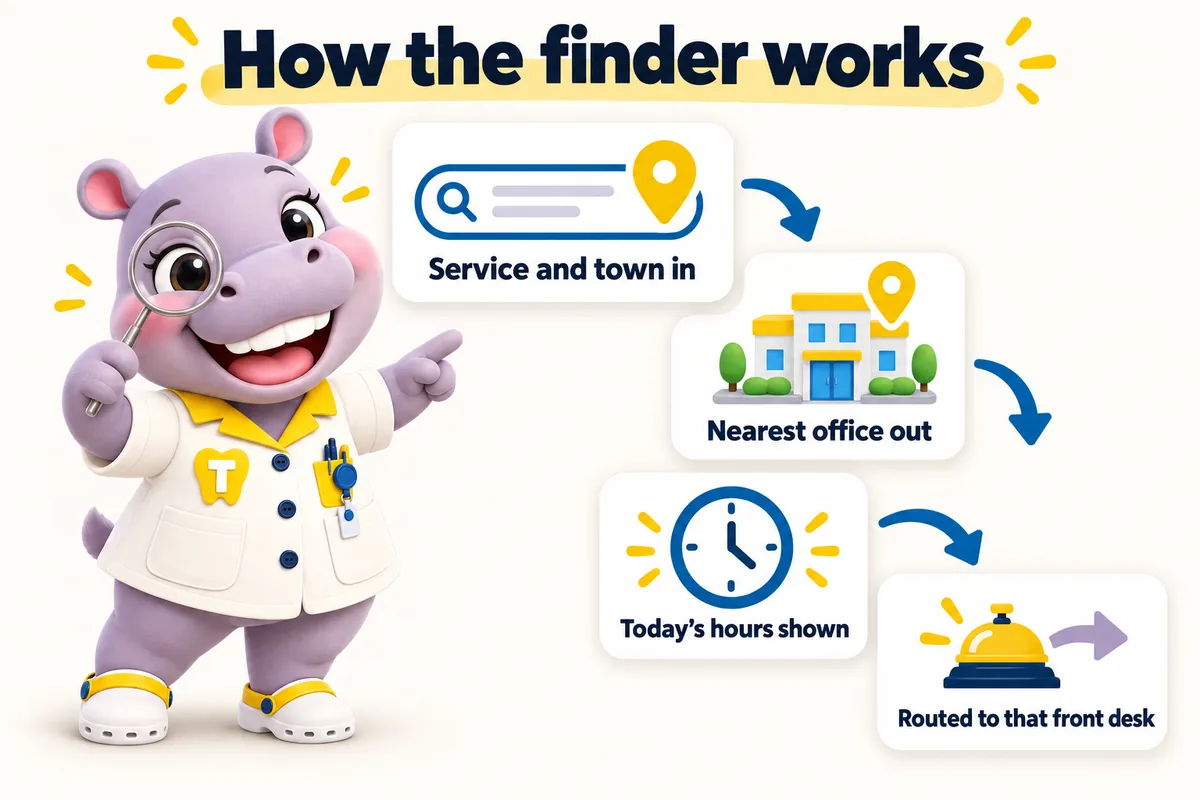
Whichever structure you pick, patients meet the same tool: they choose a service and type a town, and the finder resolves to the nearest office that offers it, with its hours today, the providers on site and a booking request that goes to that front desk. It is the difference between a patient reading an address list and a patient getting an appointment request in. On a hub the finder covers every office; on separate sites each site carries the finder scoped to its own office and its nearest siblings, so a full diary at one location still points somewhere useful.
Groups grow, and a website that makes growth expensive quietly discourages it. Adding an office to a ChairsideWeb site is a revision: you send the address, the hours, the providers and the services, and the office page, its schema, its finder entry and its booking route are built and live within the revision turnaround. There is no new subscription, no per-office fee and no rebuild. The same is true in reverse when an office closes or is sold: the page is retired and redirected so nothing that ranked turns into a dead end.
Who it is for
Groups with offices in several towns that need each location to stand on its own in search while the group reads as one.
Groups with offices across Texas, Florida, California and New York use the same structure: one page per office, written for its own town.
Symptoms
How the work is done
The same four steps for every service. The only thing paid before launch is the first month.
Pick a plan and pay the first month. That is the whole commitment; the $797 build fee waits until your site is live.
Thirty minutes with your operations lead: offices, providers, services, brand, where each office's requests should go, and hub or one site per location.
We design the site, write the pages, configure the finder for each office and connect each front desk. You review, we revise.
Your site goes live in 7, 10 or 15 days depending on the plan. Only then is the $797 build fee invoiced. Weekly updates start the same week.
Thirty minutes
We open a site built for a group like yours, walk the pages a patient would, and tell you which plan fits. Plans from $137 a month; the $797 build fee is invoiced after launch.
Deliverables
Hub or one site per location, argued from how your offices are named and where their patients come from, on the onboarding call.
Address, hours, parking, entrance notes, the providers on site, the services offered there and its own Dentist schema.
Service plus town to the nearest chair, with the hours and providers for that office and a booking request attached.
Each office keeps its own destination, whether that is a practice management system, a group CRM or both.
Hours, closures, providers and insurance changes emailed from any office and applied every week without using a revision.
One monthly fee covers the group however many offices you have. Adding one is a revision, not a new subscription.
Moving from separate sites to a hub, or the other way, is done with redirects rather than a rebuild.
Risk reversal
Each promise is written with its condition in plain sight, so nothing is discovered after the invoice.
The $797 one-time build fee is invoiced after launch, once you have seen the site live and are happy with it.
Condition The first monthly fee is paid up front to start the plan.
Every page we build scores at or above the target on mobile and desktop at launch.
Condition If a page drops below it because of our work, we fix it at no charge and it does not use a revision.
The site starts ranking for local searches in your area within the window.
Condition If it has not, we keep working on it at no charge. We never promise a specific position.
Built in, not bolted on
A dental website carries obligations a brochure site does not. These ship with every plan, written for your practice and reviewed by you before launch.
These pages and practices help you meet common US requirements for a dental practice website. They are not legal advice, and we recommend your own counsel reviews the policies before launch. We are not a dental practice, dental group, dentist or healthcare provider, and we are not a law firm.
A privacy policy and site terms written around what your site actually collects, drafted for your review and your counsel's sign-off. Built with state privacy laws such as the CCPA in California in mind.
Analytics and marketing tags load only after a visitor agrees, and the cookie policy lists what the consent banner controls.
Real contrast ratios, visible focus states, keyboard navigation and alt text, built with the Americans with Disabilities Act (ADA) and WCAG 2.2 AA in mind, plus a statement telling patients how to report a problem.
Request forms are designed not to collect health information. That keeps the website out of your HIPAA scope as far as a website can be, while your intake system handles records.
Where a form or the AI Engine sends texts, consent wording sits next to the phone field, and we file the A2P 10DLC carrier registration for you on plans with the AI Engine.
Service pages and articles say they are general information, not a diagnosis or treatment plan, and send patients to your providers for anything about their own care.
Reviews
Our old dental office selection routine was a shared inbox and crossed fingers. Requests are assigned automatically, with a backup for when the owner is away. Duplicate replies and orphaned messages have both quietly ended.
Got Inquiry assignment and staff handover for dental office selection
Converting our dental office selection attachment into proper pages was overdue. I can send the exact section someone needs, and they can read it without downloading anything. A printable copy still exists for those who ask.
Got Structured reference pages for dental office selection
Our dental office selection information finally sits beside the contact details that belong with it. Each service description carries its own local contact, and the form inherits it. It removed an irritation on both sides of the phone line.
Got Location information and contact routing for dental office selection
Out of scope
So nobody is surprised after ordering. Each of these is a deliberate line, not an upsell waiting to happen.
We do not write treatment recommendations, success rates, outcome claims or before-and-after captions. Your clinicians own every statement about care.
Request forms ask for a name, contact details, the office, the service and a preferred time. Medical history, insurance IDs and consent forms stay in your own intake system, never on the website.
We build pages that are fast and relevant enough to be good landing pages for your ads. Running and bidding on the campaigns themselves stays with you or your ads partner.
We route requests into the system or CRM each office already uses, by API, Zapier or Make. We do not sell, host or administer the practice software itself.
We use the office and team photos you own and have consent to publish, sized for their slots. Where you have none yet we use neutral, non-clinical images until yours arrive.
There are none. One fee covers every office in the group; extra revisions beyond 5 a month are a flat $20 each.
What's in each plan
What each feature does, the everyday problem it removes, what you have to do (usually nothing), and which plan carries it.
Cost
One fee per group, however many offices. Adding an office later is a revision, not a new subscription, and the build fee is charged once for the whole group.
Timeline
Counted from the onboarding call, not from purchase. Revisions after launch are completed within 2 to 5 working days.
Case studies
No. 07Orthodontics
Day to day with dental office selection, duplicated replies and orphaned messages happened in the same week. Stepping in for an absent colleague meant archaeology through long email chains.
20 working days
No. 08General dentistry
When it comes to dental office selection, there were no direct links to individual answers, just one long attachment. A thirty-second question required a three-megabyte reply.
25 working days
No. 10Multi-location groups
With dental office selection, subjects gave nothing away. The morning sort consumed the hour that answering should have had.
15 working days
Per group. One monthly fee covers every office on the site, however many you have, on a hub or on separate sites within the same plan. The one-time build fee is also charged once for the whole group.
Yes. We map every page to its new address, add 301 redirects from the old URLs and keep the old domains working as redirects for as long as you keep them registered. It is a revision-level project, not a rebuild.
Neither wins automatically. A hub concentrates authority so a new office page benefits from everything published before it. Separate sites keep each office unambiguous for its own town. What matters more than the choice is that every office has its own page, its own schema and its own address, which both structures give you.
No, and usually they should not. Different trading names is the clearest signal that one site per location fits better, because a hub would force a patient to accept a brand they have never heard of before reaching the office they searched for.
Every form, finder request and AI-taken booking carries the office, the provider and the service, and is delivered to that office's system by API, Zapier or Make. If one office changes its practice management system, only that office's routing changes.
As many as the group has. The fee is per group, and each office gets its own page, schema and booking route.
Yes. A hub can carry offices in Texas, Florida and California or anywhere else, each with its own address, hours and state-specific details on its own page.
Yes. Each location page is matched to that office's profile so the map listing and the page agree. On the Group plan we manage the profiles for you.
A live walk-through of the site you would get, in about 30 minutes. Plans from $137 a month, the $797 build fee invoiced only after launch, domain and hosting included.
Book a demoOr email and a person replies within one working day.
ChairsideWeb uses the cookies below. Necessary cookies keep the site working and cannot be turned off.
Saved on this device only. Press Esc to close.